Use the Countries page to decide which licensed countries to display in the address search field, set the default country, and optionally configure datasets.
The table only lists those countries which are licensed by the provided Address Validation authentication token. If a previously active country becomes unlicensed it will be highlighted with a yellow background and a warning will also be shown at the top of the page. Use the Remove unlicensed countries button in the top menu to disable and remove these countries.
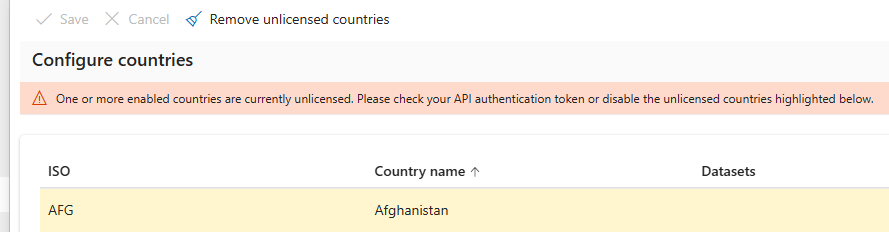
Configuring countries
- Go to the Experian Data Validation Configuration Power App.
- Select the Countries page from the left menu.
- If you require a licensed country to appear in the address search field it must be enabled. Simply check the box in the Enabled column corresponding to the country and click the Save button.
- To change the default country used by the address search field, simply select the radio button in the Default column, corresponding to the country, and click the Save button.
- To revert any changes you can click the Cancel button.
Configuring datasets
Our Experian Address Validation documentation details what datasets are available for each country and territory.
Currently, the following countries have options for additional datasets beyond the default address dataset:
- Australia
- Ireland
- New Zealand
- United Kingdom
For these four countries, you can set the default dataset, which should be used, as well as any additional datasets to be used together with the default dataset.
Specify a dataset
The dataset you specify when sending a search request will also be used for the format call. If you don't specify a dataset, the default value address (ISO CODE-address, i.e. gb-address), will be used.
To specify address datasets:
- Go to the Experian Data Validation Configuration Power App.
- Select the Countries page from the left menu.
- Fill in the Datasets column for the relevant country. Currently, this only applies to the United Kingdom, Ireland, Australia and New Zealand. The text field should contain a single dataset or comma separated list of datasets, although multiple datasets are currently only supported for the United Kingdom.
Examples:
- Australia:
au-address-datafusion
- United Kingdom:
gb-additional-notyetbuilt,gb-additional-multipleresidence
Importance of format
If you do not enter the datasets in the correct format, they will not work. Make sure you are following the format instructions precisely and have entered the name correctly.
